
Guides/Listening
Listen with the screen off
Lock your phone and Readio keeps reading, page after page.
Works oniPhoneAndroid
Lock the phone
- Open a book and press play.
- Lock the phone, or switch to another app.
The voice keeps reading. While the app is open, Readio gathers the text of the pages ahead of the voice, so it has more to read after the screen goes dark. When you open Readio again, the page catches up with the voice.
Readio plays with the iPhone’s silent switch on. It does not play over other sound: starting a book stops music or a podcast from another app.
Listening in the apps needs a paid plan, Readio Pro. See Plans and billing.
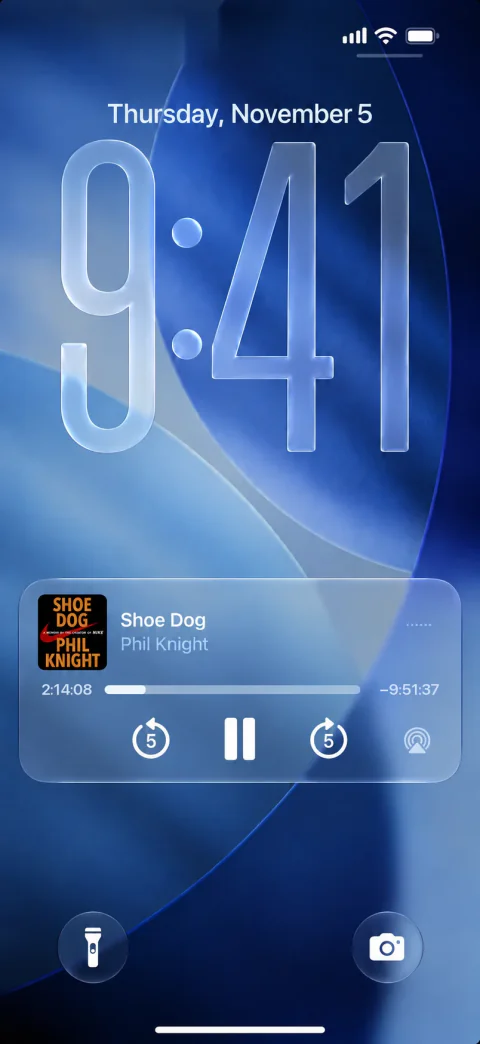
Lock-screen controls
The lock screen and Control Center show the book’s title and author, with:
- Play and pause.
- Skip back and skip forward 5 seconds.
- A progress bar on iPhone. It covers the stretch being read now.
On Android, the same buttons are in the media notification.
When the voice stops
Open Readio again and look at the player.
- Preparing…: Readio is waiting for sound. It makes the sound for up to five screens ahead of the voice, so a short gap in the connection is not heard. After a longer one the voice stops, Readio keeps asking, and it goes on by itself when the connection is back.
- A line that Readio could not continue, ending “tap play to try again”: tap play. Readio starts from the page on screen.
- Book finished: the voice reached the last page and Readio paused.
- A moon in the player: you set a sleep timer and it may have ended. See Use the sleep timer.
- Nothing but a paused player: a call or another app took the sound. Press play.
A phone call pauses the book. When the call ends and the phone hands the sound back, Readio starts again. If another app keeps the sound, the book stays paused until you press play.
Change voice or speed first
The lock screen has no voice or speed control. Set both in the book before you lock the phone. See Choose a voice and speed.
Questions
Yes. Readio makes the voice as it reads, so it needs the internet. Pages you have heard before in the same voice play again from your phone.
Yes, with Readio. Press play in a book, then lock the iPhone: the voice goes on, and play, pause and the 5-second skips are on the lock screen. Listening needs Readio Pro.
Yes. The silent switch does not mute the book. Use the volume buttons.
Readio pauses for the call. It starts again afterwards when the phone hands the sound back. If it stays paused, press play.
Most often the connection dropped, a sleep timer ended, or another app took the sound. Open Readio again: the player shows what happened.